Showing posts with label Control statements. Show all posts

Wednesday

MEMORY LAYOUT IN C PROGRAMING

0 comments

 MEMORY LAYOUT IN C PROGRAMING

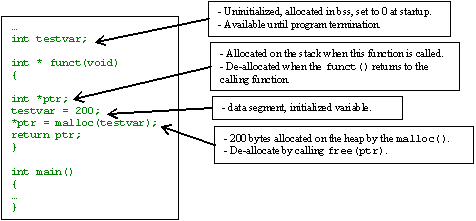
Process address space is organized into three memory areas, called segments: the text segment, stack segment, and data segment (bss and data) and can be illustrated below.


Text segment or code segment - 

Where your program code (in assembly code format)  will be stored.


Initialized data – data segment


Statically allocated and global data that are initialized with nonzero values live in the data segment.  Each process running the same program has its own data segment.  The portion of the executable file containing the data segment is the data section.


Uninitialized data – bss segment


BSS stands for ‘Block Started by Symbol’.  Global and statically allocated data that initialized to zero by default are kept in what is called the BSS area of the process.  Each process running the same program has its own BSS area.  When running, the BSS, data are placed in the data segment.  In the executable file, they are stored in the BSS section.  For Linux/Unix the format of an executable, only variables that are initialized to a nonzero value occupy space in the executable’s disk file.

Heap


The heap is where dynamic memory (obtained by malloc(), calloc(), realloc() and new – C++) comes from.  Everything on a heap is anonymous, thus you can only access parts of it through a pointer. As memory is allocated on the heap, the process’s address space grows.  Although it is possible to give memory back to the system and shrink a process’s address space, this is almost never done because it will be allocated to other process again.   Freed memory (free() and delete – C++) goes back to the heap, creating what is called holes.   It is typical for the heap to grow upward.  This means that successive items that are added to the heap are added at addresses that are numerically greater than previous items.  It is also typical for the heap to start immediately after the BSS area of the data segment.  The end of the heap is marked by a pointer known as the break. You cannot reference past the break. You can, however, move the break pointer (via brk() and sbrk() system calls) to a new position to increase the amount of heap memory available.


Stack


The stack segment is where local (automatic) variables are allocated.  In C program, local variables are all variables declared inside the opening left curly brace of a function's body including the main() or other left curly brace that aren’t defined as static.  The data is popped up or pushed into the stack following the Last In First Out (LIFO) rule.  The stack holds local variables, temporary information, function parameters, return address and the like.  When a function is called, a stack frame (or a procedure activation record) is created and PUSHed onto the top of the stack. This stack frame contains information such as the address from which the function was called and where to jump back to when the function is finished (return address), parameters, local variables, and any other information needed by the invoked function. The order of the information may vary by system and compiler.  When a function returns, the stack frame is POPped from the stack.  Typically the stack grows downward, meaning that items deeper in the call chain are at numerically lower addresses and toward the heap.


Disk file segments 


ANOTHER EXAMPLE

//test.c file
int global_var1 = 10; ==> data segement
int main()
{
int local_var1 = 5; ==> stack
static int local_var2 = 20; ==> data segement
int * dynamic_var3 =  malloc(sizeof(int) * 5); ==> heap
printf (“all done!”);
return 0;


Read More ->>

for statement in C Programming

0 comments

 for statement in C Programming

In while and do while statement we need to write logic to repeatedly execute a block of statement by initializing a counter and incrementing it after a particular steps. This sometime looks tedious and decreases the readability of the program. The readability of the program can be improved by using for statement. Using for statement we can merge all the three parts i.e. assignment, condition checking and increment/decrementing.

Syntax:
for(initialization; test condition; increment/decrement){
/*block of statement*/
}

Initialization: setting up a loop counter to initial value
test condition: Testing the loop counter to determine whether the loop needs to be executed or not.
increment/decrement: Increment or decrement the loop counter value

Explanation:

The for loop is executed as follows:
1) The initial counter value is initialized. This initialization is done only once for the entire for loop.
2) After the initialization, test condition is checked. Test condition can be any relational or logical expression. If the test condition is satisfied i.e. the condition evaluates to true then the block of statement inside the for loop is executed.
3) After the execution of the block of statement, increment/decrement of the counter is done. After performing this, the test condition is again evaluated. The step 2 and 3 are repeated till the test condition returns false.

The above example for while loop can re-written as follows:
#include<stdio.h>
#include<conio.h>
void main(){
int i;
clrscr();
for(i=1; i<=5;i++){ printf("%d This will be repeated 5 times\n", i); } printf("End of the program"); getch(); } Output:
1 This will be repeated 5 times
2 This will be repeated 5 times
3 This will be repeated 5 times
4 This will be repeated 5 times
5 This will be repeated 5 times
End of the program

In the above program, value 1 is assigned to i. The for loop would be executed till the value of i is less than or equal to 5.
Note: It is necessary to write the semicolon in for loop as shown in the below:
for(i=0; i<10; i++)

Consider,
for(i=0; i<10;){
printf(“Interment/decrement not used above”)
i=i+1;
}
In the above program, Increment is done within the body of for loop. Still semicolon is necessary after the test condition.

Consider,
i=0;
for(; i<10;i++){
printf(“Interment/decrement not used above”)
}
In the above program, Initialization is done before the start of for loop. Still semicolon is necessary before the test condition.
Note:
Read More ->>

switch-case statement

0 comments

switch-case statement

In some programming situation, when there are number of choices and we want to choose only appropriate choice, in that situation C provided switch statement. Thus switch statement allows us to make a decision from the number of choices.
The switch statement also known as switch-case-default.
Since, the switch statement known for decision maker.

Syntax of switch statement:


switch(integer expression)
{
 case 1 :
   do this;
   break;
 case 2 :
   do this;
   break;
 case 3 :
   do this;
   break;
 case 4 :
   do this;
   break;
 default :
   and this;
   break;
}

Example of switch-case-default statement:

/*program to demonstration of switch statement*/
 #include<stdio.h>
 #include<conio.h>
 int main()
 {
  int r=4;
  switch(r)
  {
   case 1 :
     printf("\nI am in case 1");
     break;
   case 2 :
     printf("\nI am in case 2");
     break;
   case 3 :
     printf("\nI am in case 3");
     break;
   case 4 :
     printf("\nI am in case 4");
     break;
   case 5 :
     printf("\nI am in case 5");
     break;
   default :
     printf("\nI am in default");
     break;
  }
  getch();
 return 0;
 }

Output: I am in case 4

Different types of switch statement


(a) In switch statement case arrangement may be ascending order, descending order, scrambled order. So the following program should be valid and run:

 #include<stdio.h>
 #include<conio.h>
 int main()
 {
  int r=44;
  switch(r)
  {
   case 210 :
     printf("\nI am in case 210");
     break;
   case 10 :
     printf("\nI am in case 10");
     break;
   case 1 :
     printf("\nI am in case 1");
     break;
   case 44 :
     printf("\nI am in case 44");
     break;
   default :
     printf("\nI am in defalut");
     break;
  }
  getch();
 return 0;
 }
Output: I am in case 44

(b) C also allowed to use char values in case and switch statement as:

 #include<stdio.h>
 #include<conio.h>
 int main()
 {
  char a='n';
  switch(a)
  {
    case 'm' :
      printf("\nI am in case m");
    case 'n' :
      printf("\nI am in case n");
    case 'o' :
      printf("\nI am in case o");
    case 'p' :
      printf("\nI am in case p");
    default :
      printf("\nI am in default");
  }
  getch();
  return 0;
 }

Output: I am in case n

Note: When above program run, 'm', 'n', 'o', 'p' are actually replaced by subsequent ASCII(American Standard Code for Information Interchange) code.

(c) C language allows us to check the value of any expression in a switch statement like as:
   switch(r+c*i)
   switch(10+20%2*r)
   switch(r+10*c)
   switch(r>10 || c<20)
Above all switch statement are valid.
And expression can also be used in cases provided they are constant expression.
Thus case 10+15 is correct,
and however case r+c is incorrect.

(d) The switch statement is very useful while writing menu driven program.

(e) The break statement when used in a switch takes the control outside the switch. However, use of continue will not take the control to the beginning of switch.

(f) The case keyword is followed by an integer or a character constant.
Read More ->>

goto statement in c

0 comments

Goto


The goto statement is used to alter the normal sequence of program instructions by transferring the control to some other portion of the program.

The syntax is as follows:

goto label;

Here, label is an identifier that is used to label the statement to which control will be transferred. The targeted statement must be preceded by the unique label followed by colon.
label: statement;
It is recommended that as possible as skip the goto statement because when we use goto then we can never be sure how we got to a certain point in our code. They obscure the flow of control.

Note:- goto can never be used to jump into the loop from outside and it should be preferably used for forward jump.

Let us consider a program to illustrate goto and label statement:


/*program to demonstration of goto statement*/
#include<stdio.h>
#include<conio.h>
void main()
{
 int n;
 clrscr();
 printf("Enter one digit number: ");
 scanf("%d",&n);
 if(n<=6)
   goto mylabel;
 else
 {
   Printf("Now control in main funcion.");
   exit();
 }
 mylabel:
   printf("Now control in mylabel.");
}

Output:-

Enter one digit number:9
Now control in main function.
Enter one digit number:4
Now control in mylabel.
Read More ->>

Continue statement

0 comments

Continue statement

                  continue statement is a jump statement. The continue statement can be used only inside for loop, while loop and do-while loop. Execution of these statement does not cause an exit from the loop but it suspend the execution of the loop for that iteration and transfer control back to the loop for the next iteration.

The following program illustrates the use of  continue statement.


/*demonstration of continue statement*/
      #include<stdio.h>
      #include<conio.h>
         int main()
     {
            int i,j;
            for(i=1; i<=2; i++)
         {
            for(j=1; j<=2; j++)
          {
            if(i==j)      //if i==j this statememt is true that continue will execute and skip it//
            continue;
            printf("\n%d %d",i,j);
          }
        }
       getch();
      return 0;
   }
    Output:
      1 2
      2 1

Explanation: When the value of i equals that of j, the continue statement takes the control to the for loop(inner) bypassing the rest of the statements execution in the for loop(inner).

Let's understand continue statement with another example:

/*demonstration of continue statement*/
  #include<stdio.h>
  #include<conio.h>
  int main()
  {
    int i;
    for(i=1; i<=10; i++)
   {
      if(i==6)
     continue;
    printf("%d ",i);
    }
   printf("\nNow we are out of for loop");
   getch();
   return 0;
}

 Output:-

 1 2 3 4 5 7 8 9 10
 Now we are out of for loop

Explanation: As when the value of i will becomes 6 it will move for the next iteration by skipping the iteration i=6.
Read More ->>

Break statement

0 comments

break statement

When we writing programming code, we often come across situations where we want to jump out of a loop instantly, without waiting to get back to the conditional test. The keyword break allows us to do this. When break is encountered inside any loop, control automatically passes to the first statement after the loop. A break is usually associated with an if.
The keyword break, breaks the control only from the while in which it is placed.
Let's understand break with c program example:

/*demonstration of break statement through c program*/

#include<stdio.h>
#include<conio.h>
void main()
{
 int i=5;
 clrscr();
 while(i>=1)
 {
  if(i==2)
  {
   printf("\nIt is equal to two!!");
   break;
  }
  printf("%d\n",i);
  i--;
 }
 getch();
}

Output:
5
4
3
It is equal to two!!

Thus, it is clear that a break statement takes the execution control out of the loop.
In above program, if we omitted break statement then what will be output? The answer is
5
4
3

It is equal to two!!

2
1
because when i's value is 2, condition will be satisfy and executed printf statement, after that compiler goes to next statement i.e. printf("%d",i); because loop do not terminate and it is run till the i value is not less than 1.
Read More ->>

Nesting of loops in c

0 comments

NESTED LOOP

These loops are the loops which contain another looping statement in a single loop. These types of loops are used to create matrix. Any loop can contain a number of loop statements in itself. If we are using loop within loop that is called nested loop. In this the outer loop is used for counting rows and the internal loop is used for counting columns

SYNTAX:-

for (initializing ; test condition ; increment / decrement)
{
statement;
for (initializing ; test condition ; increment / decrement)
{
body of inner loop;
}
statement;
}

PROGRAM

#include
void main ( )
{
int i, j;
clrscr ( );
for (j=1; j<=4; j++)
{
for (i=1; i<=5; i++)
{
printf (“*”)
}
printf (“\n”);
}
getch ( );
}
Read More ->>

Loop in c languag

0 comments

Looping

Loops provide a way to repeat commands and control how many times they are repeated. C provides a number of looping way.

while loop


The most basic loop in C is the while loop.A while statement is like a repeating if statement. Like an If statement, if the test condition is true: the statments get executed. The difference is that after the statements have been executed, the test condition is checked again. If it is still true the statements get executed again.This cycle repeats until the test condition evaluates to false.
Basic syntax of while loop is as follows:


while ( expression )
{
   Single statement
   or
   Block of statements;
}   
for loop
for loop is similar to while, it's just written differently. for statements are often used to proccess lists such a range of numbers:
Basic syntax of for loop is as follows:

for( expression1; expression2; expression3)
{
   Single statement
   or
   Block of statements;
}
   
In the above syntax:
·    expression1 - Initialisese variables.
·    expression2 - Condtional expression, as long as this condition is true, loop will keep executing.
·    expression3 - expression3 is the modifier which may be simple increment of a variable.
do...while loop
do ... while is just like a while loop except that the test condition is checked at the end of the loop rather than the start. This has the effect that the content of the loop are always executed at least once.
Basic syntax of do...while loop is as follows:


do
{
   Single statement
   or
   Block of statements;
}while(expression);    
Read More ->>

Nested if...else statement (if...elseif....else Statement)

0 comments

Nested if...else statement (if...elseif....else Statement)

The if...else statement can be used in nested form when a serious decision are involved.

Syntax of nested if...else statement.

if (test expression)
     statements to be executed if test expression is true;
else
     if(test expression 1)
          statements to be executed if test expressions 1 is true;
       else
          if (test expression 2)
           .
           .
           .
            else
              statements to be executed if all test expressions are false;

How nested if...else works?

If the test expression is true, it will execute the code before else part but, if it is false, the control of the program jumps to the else part and check test expression 1 and the process continues. If all the test expression are false then, the last statement is executed.
The ANSI standard specifies that 15 levels of nesting may be continued.

Example of nested if else statement

Write a C program to relate two integers entered by user using = or > or < sign.
#include <stdio.h>
int main(){
     int numb1, numb2;
     printf("Enter two integers to check".\n);
     scanf("%d %d",&numb1,&numb2);
     if(numb1==numb2) //checking whether two integers are equal.
          printf("Result: %d=%d",numb1,numb2);
     else
        if(numb1>numb2) //checking whether numb1 is greater than numb2.
          printf("Result: %d>%d",numb1,numb2);
        else
          printf("Result: %d>%d",numb2,numb1);
return 0;
}
Output 1
Enter two integers to check.
5
3
Result: 5>3
Output 2
Enter two integers to check.
-4
-4
Result: -4=-4
Read More ->>

NESTED IF

0 comments

NESTED IF

If within if is called nested if and it is used when we have multiple conditions to check and when any if condition contains another if statement then that is called ‘nested if’.
If the external condition is true, then the internal if condition or condition are executed and if the condition is false then the else portion is executed of the external if statement

SYTAX

if (condition)
{
…….
…….
}
if (condition)
{
…….
…….
}
else if (condition)
{
…….
…….
}
else if (condition)
{
…….
…….
}
else
{
…….
……. }
}
else
{
…….
…….
}

Read More ->>

IF in c

0 comments

If statement in c

C Programming if, if..else and Nested if...else Statement
Decision making are needed when, the program encounters the situation to choose a particular statement among many statements. In C, decision making can be performed with following two statements.
 
1.    if...else statement
2.    switch statement
 
if statement syntax
 
if (test expression){
       statement/s to be executed if test expression is true;
}
If the test expression is true then, statements for the body if, i.e, statements inside parenthesis are executed. But, if the test expression is false, the execution of the statements for the body of if statements are skipped.
Flowchart of if statement


Example of if statement
Write a C program to print the number entered by user only if the number entered is negative.

#include <stdio.h>
      int main(){
      int num;
      printf("Enter a number to check.\n");
      scanf("%d",&num);
      if(num<0)       /* checking whether number is less than 0 or not. */
            printf("Number=%d\n",num);  
/*If test condition is true, statement above will be executed, otherwise it will not be executed */
      printf("The if statement in C programming is easy.");
return 0;
}
Output 1
Enter a number to check.
-2
Number=-2

The if statement in C programming is easy.
When user enters -2 then, the test expression (num<0) becomes true. Hence, Number=-2 is displayed in the screen.
Output 2
Enter a number to check.
5
The if statement in C programming is easy.
When the user enters 5 then, the test expression (num<0) becomes false. So, the statement for body of if is skipped and only the statement below it is executed.
Read More ->>

Control statements

0 comments

Control statements

Compound statement or block
A compound statement or a block is a group of statements enclosed within a pair of curly braces{}
The statements inside the block are executed sequentially .the geneal form is

{
  Statements1;
 Statements2;
…………………………..

………….

………………….
}

Read More ->>
 

| C programing tutorials © 2009. All Rights Reserved | Template Style by My Blogger Tricks .com | Design by Brian Gardner | Back To Top |